
SendLater for Outlook3.34 - Download
You'll be able to download in few seconds.
Publisher Description
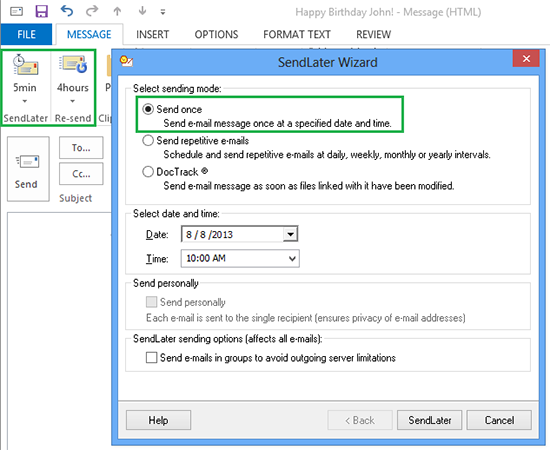
SendLater is free e-mail scheduler with a recurring email option. Prepare all your email notifications and reminders, greetings in advance and schedule their delivery. Each time you reply or create a new e-mail message, you will be able to choose a particular time for your PC to send your message. Just click the "SendLater" icon on the toolbar and select the sending time using time-and-date selector. Click "Send later" and your message will be scheduled for that time and saved in the "Send Later" folder. And at any time, you can open the "Send Later" folder and edit, remove or send your messages manually. Re-send email in case it was not responded and send repetitive emails until the response is received.
Use SendLater Pro Edition to set up repetitive emails at comprehensive time intervals. Attach documents to the scheduled delayed e-mail with DocTrack feature. As long as your computer is online, your e-mail will be sent automatically even Outlook is not running.
SendLater Pro Edition features:
- Repeat your email until a response is received;
- Re-send email in case it was not responded;
- Send delayed or repetitive emails even if your Outlook is not running;
- Attach documents to the scheduled delayed email;
- Link a file or folder to a delayed email message to send the most recent file/folder version;
- Delayed email messages will be sent automatically;
- Use Send to send email messages from mailto links;
- Send a delayed group message as a single email to all recipients;
- A group message sent personally to a single recipient;
- Split large recipient lists into smaller groups;
- When sending recurrent emails you will be able to set path to CSV file and recipients will be loaded from that CSV file automatically.
SendLater examples of use:
- No more reminders needed. Schedule repetitive emails at comprehensive intervals.
- Direct marketing letters and reports
- Routine company meetings follow-up reminders
- Never miss birthdays or other events.
About SendLater for Outlook
This Other Email Tools program is available in English. It was last updated on 29 September, 2026. SendLater for Outlook is compatible with the following operating systems: Windows, Windows-mobile.
The company that develops SendLater for Outlook is 4Team Corporation. The latest version released by its developer is 3.34.
The download we have available for SendLater for Outlook has a file size of 12.6 MB. Just click the green Download button above to start the downloading process. The program is listed on our website since 2017-03-30 and was downloaded 0 times. We have already checked if the download link is safe, however for your own protection we recommend that you scan the downloaded software with your antivirus. Your antivirus may detect the SendLater for Outlook as malware if the download link is broken.
How to install SendLater for Outlook on your Windows device:
- Click on the Download button on our website. This will start the download from the website of the developer.
- Once the SendLater for Outlook is downloaded click on it to start the setup process (assuming you are on a desktop computer).
- When the installation is finished you should be able to see and run the program.
Program Details
System requirements
Download information
Pricing
Version History
version 3.34
posted on 2017-03-30
Update includes 2 new features as well as several other updates and fixes. First - when sending recurrent emails users will be able to set path to CSV file and recipients will be loaded from that CSV file automatically. Second - now recurrent Daily and Weekly emails can be sent on custom times.
version 3.33
posted on 2016-10-31
SendLater has been updated to ensure better performance and stable work with latest Microsoft Outlook without issues.
version 2.20.0719
posted on 2009-11-20
Support of Windows 7 and Outlook 2010. Improved Sendnow/ready2Send functionality. Many bug fixes.
Disclaimer
External Download
We do not host SendLater for Outlook on our servers. We did not scan it for viruses, adware, spyware or other type of malware. This app is hosted by the software publisher and passed their terms and conditions to be listed there. We recommend caution when installing it.
The external download link for SendLater for Outlook is provided to you by apps112.com without any warranties, representations or guarantees of any kind, so access it at your own risk.
If you have questions regarding this particular app contact the publisher directly. For questions about the functionalities of apps112.com contact us.
